
If you’ve ever wished loading up your sweepstakes casino account could be as easy as waving your phone at the checkout, you’re in the right place!

Using Google Pay at Sweepstakes Casinos
In this guide, you’ll find everything you need to know about using Google Pay at sweepstakes casinos, including which sites support it, how purchases work, setup requirements, and redemption limitations, as well as how to keep deposits quick and stress-free.
We research alternative gaming platforms with a focus on the details that matter most to players, including how each site works, how clear the rules are, the overall user experience, rewards, redemptions, withdrawals, fairness, safety tools and support. Our content is written to be clear, independent and regularly reviewed as platforms, offers and features change.
Read MoreWhat Is Google Pay / Google Wallet?
If you’ve ever tapped your phone to pay for coffee or bought an item in an app without typing card numbers, you’ve used the basic idea behind Google Pay.
Google Pay (sometimes branded as Google Wallet depending on your region, for example, Australia, Hong Kong, or Mexico) is Google’s digital payment platform that securely stores your card, debit, or bank account information and lets you make payments with a couple of taps on your Android device or in a supported browser.
Google Pay’s key characteristics are:
Editor Picks
Accept Google Pay
1

50,000 GC + 1 SC
Redemption time:
24h- Huge variety of live games
- Instant redemptions
- Crypto play




2

25,000 GC + 2.5 SC
Redemption time:
96h- Huge slot variety
- Tournaments
- Ongoing Discounted Packages


4

100,000 GC + 2 Free SC
Redemption time:
48h- Crypto payments
- Fast redemptions
- Create your own purchase packages
5

7,500 GC + 2.5 SC
Redemption time:
72h- Great Contests
- Top Tier Slots
- Interactive Game Play

6

5,000 GC + 2 SC
Redemption time:
48h- Infinity Play
- Branded Tournaments
- Social Media Giveaways

7

125,000 TC + 3 PE
Redemption time:
72h- Wide variety of slot features
- Excellent UX
- Plenty of tournaments

8

500,000 GC + 10 SC
Redemption time:
24h- Public on-site chat
- Fast redemptions
- No deposit bonus
9

10,000 GC + 1 SC
Redemption time:
24h- Classic slots
- Excellent referral program
- Responsive customer support
Google Pay isn’t universally supported at every sweepstakes casino, and in many cases its availability depends on the operator’s payment processor, region, and backend setup. Below is a vetted list of sweepstakes casinos that accept Google Pay for Gold Coin package purchases (availability can change, so always double‑check in the cashier).
How Google Pay Works at Sweepstakes Casinos
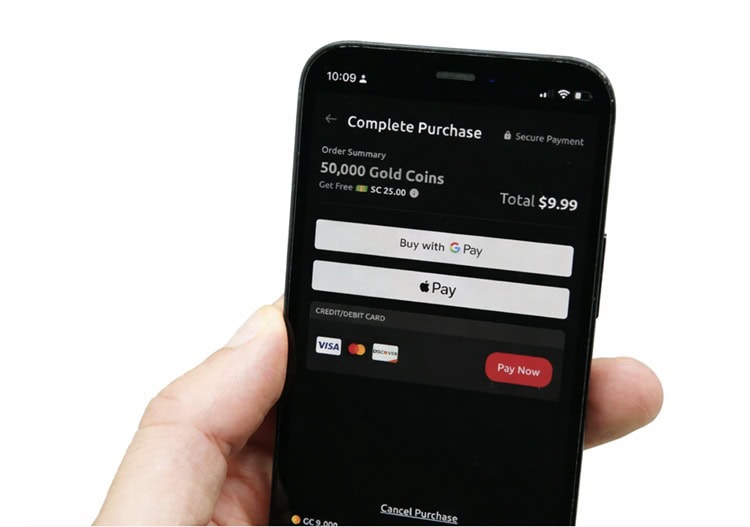
Using Google Pay to fund your sweepstakes account should be quick – a few taps and you’re done. Just make sure you follow a few basic steps and requirements first.
Requirements and Setup
Before you can use Google Pay at a sweepstakes casino cashier, double-check you’ve got these in place:
Compatible device or browser
GPay sweeps works best on Android devices with NFC support for tap‑to‑pay, but for online sweepstakes casinos you only need a supported Android phone/tablet or a browser that supports Google Pay (Chrome, Android WebView). iOS devices don’t support Google Pay.
Google account
You must be signed into an active Google account on your device or browser.
Linked payment method
You need at least one credit/debit card or bank account linked to Google Pay. Some banks may have restrictions, and not every card type is supported, so if your first card doesn’t work, try another.
Device security enabled
Google Pay requires that your phone be secured with a PIN, pattern, fingerprint, or face unlock.
Buying Gold Coin Packages with Google Pay
Based on our testing, GPay sweeps is one of the easiest ways to buy Gold Coins, all you need to do is:
1. Log in to your sweepstakes casino account – Open the casino app on your Android device or a supported browser and head over to the cashier or coins store.
2. Select the Gold Coin package you want – Choose your desired amount of GC (with most Gold Coin packages you’ll receive free Sweeps Coins).
3. Choose Google Pay at checkout – In the payment options, tap the Google Pay button. You’ll see a prompt with your linked cards or bank accounts.
4. Verify the payment method – Confirm which card or account you want to use for this purchase. If you have multiple options, select the one that works best.
5. Approve via device security – Authorize the transaction using your phone’s PIN, fingerprint, or face unlock.
6. Android sweeps casino payments will be processed instantly – Google Pay securely communicates with the casino’s payment processor. Most transactions are approved in seconds, though some may take a minute depending on the processor.
7. GC (and any bonus SC) credited – Once the transaction is approved, your Gold Coins appear in your casino account, ready to be used.
Redemptions & Google Pay
While Google Pay is fantastic for depositing funds and buying Gold Coins, it’s rarely used for sweepstakes redemptions. Unlike deposits, most sweepstakes casinos don’t allow you to cash out directly to Google Pay.
Even traditional card withdrawals are uncommon due to processing restrictions and regulatory requirements. The most common redemption methods in the US are ACH bank transfers, e-wallets (Skrill or PayPal), gift cards, and crypto (Bitcoin, USDT, etc.).
That said, while GPay sweeps shines for getting your account funded in seconds, withdrawals require other methods.
Pros & Cons of Google Pay for Sweeps Players
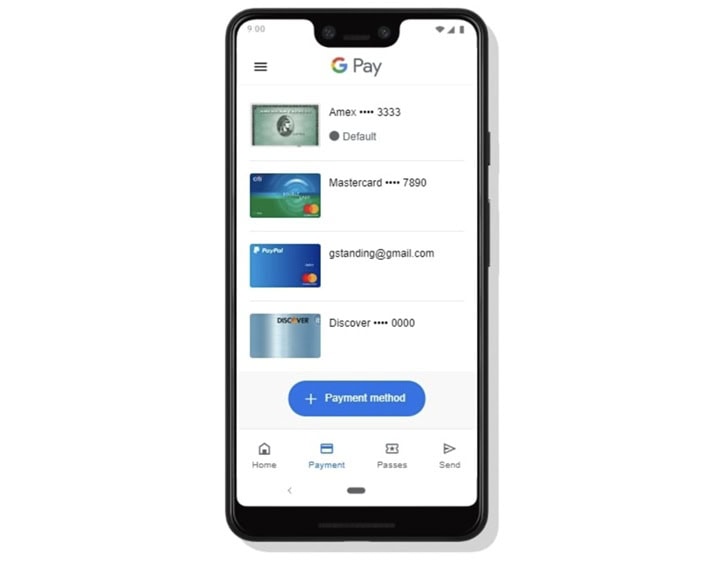
Google Pay has rapidly become one of the top ways to spend online, and that includes loading up Gold Coin packages at sweepstakes casinos. But like any payment method, it’s not perfect. Read on to see its main advantages and limitations.
Advantages
- Instant payments – One of the biggest perks is speed. Google Pay authorizes transactions almost instantly, so once you approve via PIN, fingerprint, or face unlock, your purchase is processed and your Gold Coins will appear without waiting for batch processing windows or bank settlement delays.
- No Google fees – Google doesn’t charge extra for sweepstakes deposits. You’re only spending what you authorize. There is no surcharge or wallet holding fee from Google’s side.
- Card number protection – Google Pay uses tokenization: a unique digital code stands in for your actual card number. Sweepstakes casinos never see your real card number, which prevents theft if a site is compromised.
- Zero card typing – Forget fumbling with long card digits. With Google Pay, you simply tap the button, choose your linked card, and verify with biometric or PIN security.
- Convenience across apps and browsers – Whether you’re on mobile or Chrome desktop, Google Pay is widely supported at sweepstakes casinos. You don’t need a separate wallet app if your card is already linked.
- Secure authorization with device security – Because Google Pay requires your device’s lock screen auth, it ensures only you can authorize Android sweeps casino payments, even if someone else picks up your phone.
Drawbacks
- No direct redemptions – Google Pay is almost exclusively a purchase method. You generally cannot withdraw winnings to Google Pay, which means you’ll need ACH, e-wallets, gift cards, or crypto, none of which route back into Google Pay.
- Not compatible with iOS devices – Unlike Apple Pay, which is baked into iPhones and Safari, Google Pay doesn’t have native support on iOS. If you’re an iPhone user, Google Pay won’t be an option at sweepstakes casino cashiers.
- Must link a credit/debit card or bank – Google Pay isn’t a standalone balance. You must tie it to a card or bank account. If you prefer pure wallet‑only funding, this is not the payment method for you.
- Possible cash‑advance fees – Some credit cards treat sweepstakes casino deposits as cash advances. If your card issuer does this, you could face higher interest or fees, even though Google Pay itself doesn’t levy fees.
- Trusting your cards with Google – While Google services are robustly secured, storing multiple cards with one company means you’re placing a lot of trust in its security. Data breaches are rare but not impossible.
- Device maintenance is essential – Google Pay’s security depends on your device being up to date. Out‑of‑date OS or unlocked devices increase vulnerability.
- Not universally supported – Some sweepstakes casinos still don’t offer Google Pay due to payment processor limitations. If you rely exclusively on it, you might find fewer options than with cards or ACH.
Best Situations to Use Google Pay
These are the ideal times to use Google Pay at sweepstakes casinos:
- You want Gold Coins right now – Need to top up quickly before a promo ends? Google Wallet sweeps gets you there without waiting.
- You’re an Android user – Native support, biometric auth, and deep integration make it seamless.
- You value card protection – Tokenization means your real card info stays hidden from the casino.
- You dislike typing card info – One tap beats entering long numbers, especially on mobile.
- You prefer simple budgeting – Google Pay logs transactions clearly, helping you track how much you’re spending on GC purchases.
Security, Privacy & Budgeting with Google Pay
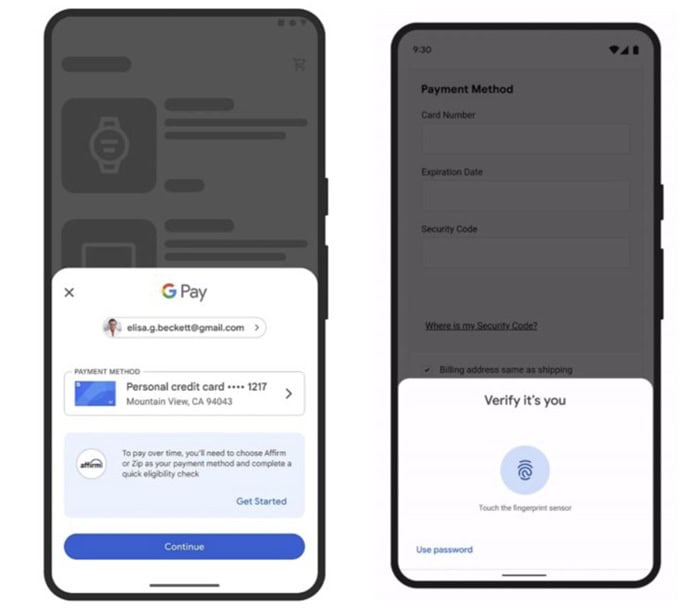
Google Pay isn’t only convenient. It also keeps your money and personal data safe while staying in control of your spending at sweepstakes casinos. Unlike typing card details directly into websites, Google Pay offers numerous security, privacy, and budgeting features that make funding your Gold Coin packages safer!
Tokenization and Data Protection
One of Google Pay’s key security features is tokenization. Instead of sending your actual card number to the casino, Google Pay generates a unique digital token for each transaction. This token represents your card but can only be used once, making it almost impossible for hackers to steal your real card information.
Google Pay also encrypts all payment data both in transit and at rest, which means that even if someone intercepted the signal, they couldn’t read or misuse your card info. Combined with PCI DSS-compliant payment processors used by sweepstakes casinos, tokenization ensures that your bank details never touch the casino’s servers.
Also, Google Pay requires verification for every transaction, usually via device security like PIN, fingerprint, or face recognition. This boosts protection beyond the token, ensuring only you can authorize a deposit.
Device and Account Security
Your device itself is a critical part of Google Pay security. Google requires that you have a secure lock screen, whether it’s a PIN, pattern, fingerprint, or facial recognition. So even if your device is compromised, someone cannot authorize payments.
Google Pay also monitors unusual activity, such as purchases from unfamiliar devices or locations, and will flag suspicious transactions for review. Linking your account to a Google account with two-factor authentication (2FA) means that even if your login credentials are leaked, the hacker still couldn’t access your payment methods without the second verification step.
For sweepstakes players, this combination of device-level locks, 2FA, and fraud monitoring complements casinos’ own security measures like age and identity verification (KYC). Keeping your phone software up to date is also crucial, as updates often patch security vulnerabilities that may give cybercriminals a path to your funds.
Tracking Spending
Beyond security, Google Pay helps you stay on top of your sweepstakes budget. Every transaction is logged in the app, including the amount, merchant, and date, so you have a clear record of how much you’re spending on Gold Coin packages.
You can also set spending limits within your card or bank account or simply monitor transaction alerts to avoid overspending. Unlike cash, which can be easy to lose track of, or a credit card buried in statements, Google Wallet sweeps features real-time tracking, so you can see exactly how much you’re committing to sweepstakes play.
Google Pay vs Apple Pay vs Cards
At sweepstakes casinos, Google Pay and Apple Pay offer a very similar experience. You get instant and secure funding (bank card details are never exposed). Both let you authorize payments with a tap or biometric approval, and both accept the same major cards, including Visa and Mastercard.
The main difference is device and compatibility. Apple Pay is exclusive to iPhones, Apple Watches, and Safari, and it’s supported at more sweepstakes casinos in the US.
Developers often prioritize Apple Pay because iOS users are easier to monetize and Apple’s payment APIs are widespread. Google Pay works on Android devices and Chrome browsers, but fewer casinos list it in their cashier.
From a user perspective, both methods provide instant processing, privacy, and no extra fees, making them excellent for fast deposits. Your Gold Coins and bonus Sweeps Coins are credited almost immediately, and you never need to type long card numbers.
FAQs
Can I withdraw my winnings to Google Pay?
Google Pay is almost always a deposit‑only method at sweepstakes casinos. Most sites don’t support direct withdrawals back to Google Pay. Common cash‑out options in the US include ACH bank transfer, e‑wallets, gift cards, or crypto.
Why doesn’t my sweepstakes casino show Google Pay as a payment option?
Not all casinos support Google Pay. Availability depends on the casino’s payment processor and your state. If you don’t see the Google Pay button at the cashier, the site likely doesn’t support it yet, or your region/payment setup isn’t eligible at this time.
Are there extra fees for using Google Pay at a sweepstakes casino?
Google Pay itself doesn’t charge extra for sweepstakes deposits. However, your card issuer or bank may charge foreign transaction or cash‑advance fees depending on how the casino processes payments. Always check your card’s terms before using it through Google Pay.
Is Google Pay safe to use for sweepstakes purchases?
Absolutely. Google Wallet sweeps uses strong encryption and doesn’t expose your full card number to the casino. You also authorize payments with device security (PIN, fingerprint, etc.). However, you should only use it on trusted casinos and secure networks to avoid fraud or phishing risks.
Does Google Pay support all card types at every sweepstakes casino?
Google Pay can store most major debit/credit cards, but individual casinos or processors may only accept certain card networks (e.g., Visa/Mastercard). If your card doesn’t work through Google Pay, try another card or payment method.
How fast are deposits with Google Pay?
Deposits via Google Pay are typically instant once you authorize the payment. The casino receives your funds immediately and credits your Gold Coins (and any bonus Sweeps Coins) right away.
Can I use Google Pay on desktop or only mobile?
You can use Google Pay on desktop if the browser and cashier support it (usually via Chrome). If you don’t see the option, your browser or casino may not support web GPay yet.

Author: Oliver Dickinson
Updated:
Oliver Dickinson is the head of strategy and serves as Lead Editor for Freaky Gaming. He has a lot of experience with sweepstakes casino style gaming and website publishing being part of many sweepstakes projects over the years. Oliver oversees editorial direction, review standards, and compliance, ensuring all content meets high standards of accuracy and transparency so that our users trust that our content is reliable.
Oliver Dickinson is the head of strategy and Lead Editor of Freaky Gaming, where he oversees content quality, and review standards across the site. With extensive experience in sweepstakes casino-style gaming and digital publishing, Oliver leads the development of Freaky Gaming’s review methodology and ensures every page is created with accuracy, transparency, and player value in mind.
Over the years, Oliver has worked across multiple sweepstakes gaming projects, giving him a strong understanding of how platforms operate, how offers are presented, and what players actually need to know before signing up. His work focuses on turning complex information into clear, practical guidance — whether that’s reviewing casino features, explaining bonus terms, or helping readers understand the differences between platforms.
As Lead Editor, Oliver is responsible for maintaining editorial consistency and ensuring content aligns with Freaky Gaming’s standards for factual accuracy, responsible messaging, and legal/compliance awareness for a U.S. audience. He works closely with reviewers, writers, and editors to make sure content is regularly checked, updated, and easy to trust.
Oliver’s editorial approach is rooted in a simple principle: readers should be able to make informed decisions based on honest, well-structured information not hype. That philosophy continues to shape Freaky Gaming’s voice and content standards across reviews, guides, and educational pages.